Why convert to MP3
MP3 works on nearly every phone, car stereo, speaker and player. People convert to it to share a recording, to shrink a WAV file, or to pull the soundtrack out of a video. Windows has no general-purpose tool for converting between audio formats, so you need an app.
Convert with Audio Converter
Audio Converter from HAYAH converts on your PC. Your audio, file names and tags are never uploaded.
- Install Audio Converter from the Microsoft Store with the button below.
- Drop files or folders onto the window. Or select files in File Explorer, right-click, choose Audio Converter, then Convert to MP3. That runs in the background and tells you when it is done.
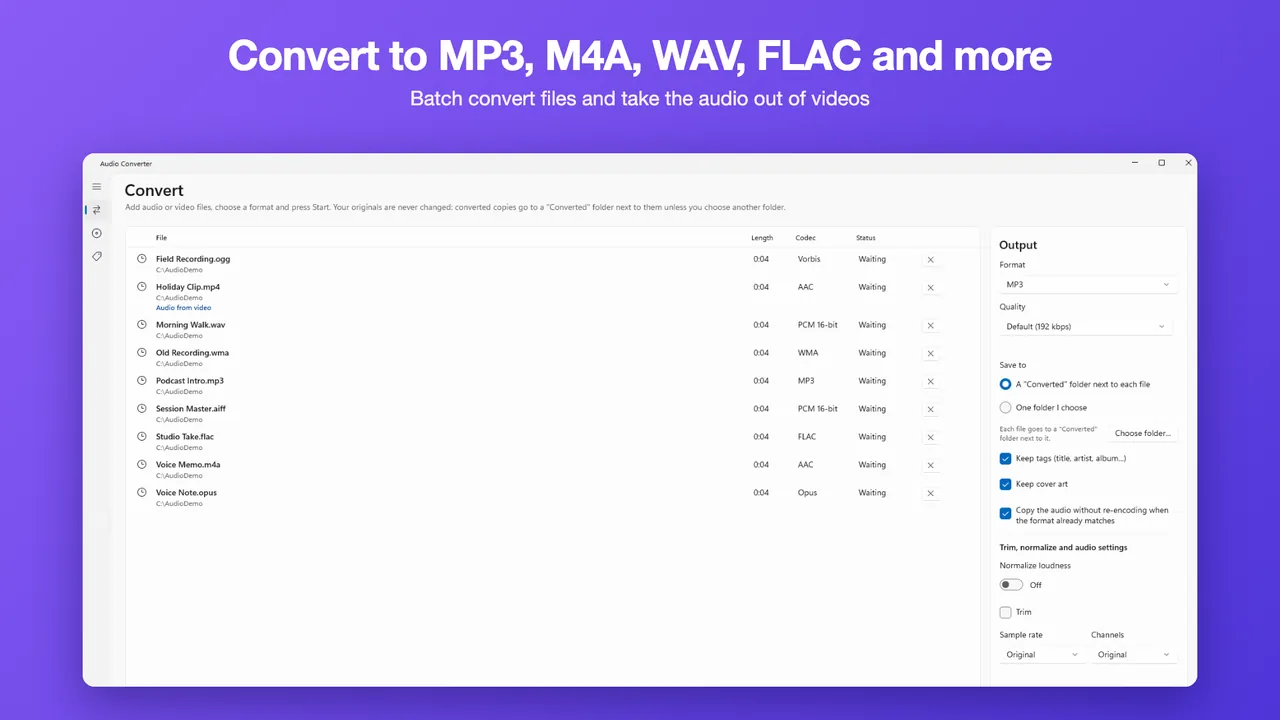
- In the app, set Format to MP3.
- Under Save to, pick a Converted folder next to each file, or one folder you choose.
- Tick Keep tags and Keep cover art if you want them carried over where the format can hold them.
- Press Convert.
Your originals are never changed, and an existing file is never overwritten.
Take the audio out of a video
Add an MP4, MOV, MKV, WebM, AVI or 3GP file the same way and choose MP3. The app extracts the soundtrack. It does not remove DRM, so copy-protected files, such as some purchased WMA files, M4P files or Audible books, are refused.
A tip on quality
Converting a lossless file such as WAV or FLAC to MP3 gives the best result. Converting one lossy file to another, such as M4A to MP3, cannot restore detail that was already discarded.
Free and Pro
Free converts 5 files at a time to MP3, M4A, WAV, FLAC and OGG at the default quality, and extracts audio from video. Pro removes the limit and adds subfolders, Opus, Apple Lossless, AIFF and WMA output, custom bitrate, trim, loudness normalizing and a tag editor. Pro is a one-time $9.99 Lifetime Unlock or a $2.99 7-Day Pass. There is no subscription.
Also see how to rip a CD to MP3 or FLAC.
Questions
Is Audio Converter free?
Which files can it read?
Are my files uploaded?
Can it convert protected files?
Can I choose the bitrate?
More guides
Prices are in US dollars and may vary by market. The Microsoft Store shows the price for your country before you buy. Microsoft, Windows, Excel and Microsoft Store are trademarks of Microsoft; HAYAH is not affiliated with Microsoft or Apple.